
Newsflash!
Here are two new little features we want to make sure you’re aware of. Not completely finished but already helpful:
StepByStep
Press F6 to pause and step through your patch one frame at a time. Press F5 to continue running the patch.^
 F6, F6, F6, F6, F5
Note how the Quad (topleft) indicates run/pause. Tremendous you say? Indeed, but beware the following caveats for now:
- this works only for vl, so if you have parts of your patch in vvvv, those will still continue to run as usual!
- tooltips don’t work in this mode yet, so you’ll need IOBoxes wherever you want to inspect values
- no stepping through slices of loops
Still you’ll see that in cases where you’re looking for a logical problem in your patch it is already useful to be able to step through its execution one frame at a time to better understand how it is evolving.
JumpToError
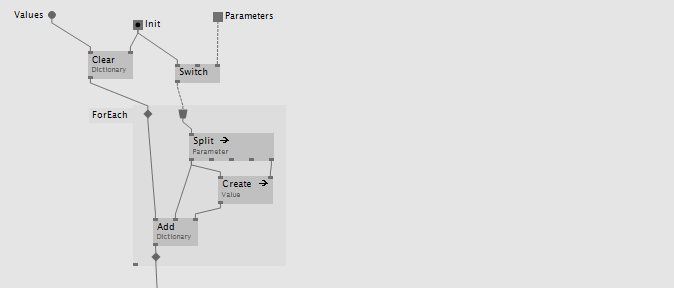 Pink: the node that threw the runtime-error.
Bright: the call stack, leading up to the error.
Dark: nodes not executed.
Pink: the node that threw the runtime-error.
Bright: the call stack, leading up to the error.
Dark: nodes not executed.
This can be useful when you’re on a debugging spree and expect an error to happen at some point. Activate this option to be brought to the point where the error occurred, the moment it happened. Saves you some navigation and highlights the nodes involved leading up to the error. Again press F6 to step or try F5 to get the patch running again after you solved the problem.
Caveat: Look closely, the error message in the tooltip actually belongs to the Add of the Dictionary. The reason for that is code-optimization which sometimes leads to the error-indicator being one node off. A setting to disable code-optimization is pending..
As mentioned, both features are not finished but are a first step into the direction of better debugging support. Still more to come..


Comments:
Comments are temporarily disabled.