
helohelohelo,
here is the fifth in a series of blogposts about our forthcoming nextbigthing that we still call vvvv50 (50). If you haven’t already done so please first read the previous issues with the titles:
Now please fasten your seat belt because this is a big one. Probably the single least asked for feature that could still become 50s unique selling point: Custom Datatypes.
There is a chance that for some of you it will now be enough to explain this in one sentence: In 50 a patch defines a datatype, horray! If that makes sense to you already, then cheers. There isn’t much more to learn in this article.
Glad you’re still reading. So you belong to the other group of people who are probably afraid that this may be the moment you’re loosing it. It being your understanding of how it will be like to patch in the future? Fear not! “Custom Datatypes” only sounds abstract but is actually a very basic and intuitive concept. You’ll understand and be happy to have them around soon, read on.
But before demonstrating how custom datatypes make our patchings easier with 50, lets first establish a problem in 45 to pave the road for the hype:
The demo scenario:
- when the left mousebutton is pressed, particles (with random velocities) are added
- when a particle reaches y < -1 it is being removed
In good old modular fashion here is how you could approach this:
A patch in 45 is merely a visual clue for the user
Step 1) A single particle
- Create a patch called Particle that has a “Start Position” (2d), a “Velocity” (2d) and an “Initialize” input
- Create a node of this Particle-patch, attach it to Mouse and Renderer and voila: A single particle moves as you click in the renderer
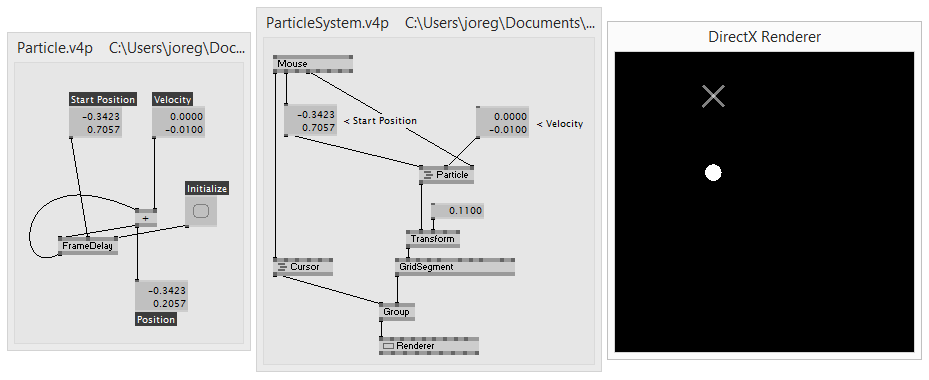
Click to enlarge.
Step 2) Multiple particles
- Want multiple particles? Just spread them, right?. But how? If we’d just put a static randomspread to the Particles velocity input we’d get multiple moving particles, yes, but we’d not be able to remove individual ones once their y < -1
- Intuitively we’d want to somehow create particles and put them into a spread as such. Only we don’t really get hold of the particle itself. What we can get access to is its position and velocity properties. So lets put those in a spread
- In order to be able to manage (ie. add/remove) individual particles we have to move the framedelay from inside the Particle patch (where we’d actually want it) to its parent patch. Now the Particle patch is degraded to a hull with the name “Particle” but it no longer holds the actual particla-data. That is bad.
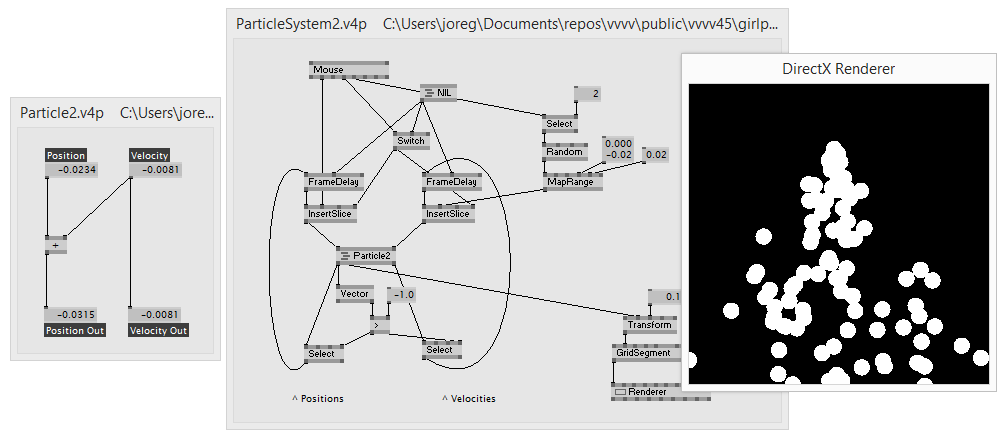
Click to enlarge.
The framedelay together with an InsertSlice and a Select allow us to easily (well,..) add and remove slices dynamically.
So far so 45. See the fact that we needed 2 framedelays here? One for Position and one for Velocity? Oh you can zip those two parameters into one spread, of course. But next you blink the boss demands the particle to have a Color and a Name and you already need 3 framedelays… See where this is going?
The general problem here is that, as mentioned in 50: That Next Big Thing. An Overview., 45 does not really understand subpatches. For 45 everything is just one big patch and when you carefully modularize the Particle patch, 45 does not get any of this. So Position, Velocity and any other parameters are just laying there but 45 does not understand that they all describe properties of a particle and actually belong together.
This is where in 45 we’d advise you to create dynamic plugins to join/split your custom datatypebeta-contribution. Thats fine for a start, only it requires you to code. Also there are three contributions that I won’t go into detail here but are worth mentioning in that respect: Messagebeta-contribution by velcromeuser, VObject by microdeeuser and VVVV.Struct by woeiuser & tonfilmuser.
So while you see there are ways in 45 to tackle such (still rather simplified) situations, they are all workarounds to that aforementioned inherent problem of 45 not knowing about subpatches. And we need you to be really frustrated about that, not about a missing grid or close-button in the UI. This is where we need you to chant in unison: “Go release the cat, we can’t work like that”.
Well, here we go:
A patch in 50 defines a datatype
What you really want to express when putting multiple properties in one patch is to wrap up all those properties into one entity that you can operate with. Which is exactly what happens in 50.
So just to make sure we got our terms straight, a quick recap: Value, String, Color, Transform,… are all primitive datatypes we’re used to. Now when we create our own datatype we can think of it as a compound of multiple primitive ones. So for example our Particle could be a compound of:
- Position (of type Vector2d)
- Velocity (of type Vector2d)
- Color (of type Color)
- Name (of type String)
In other words: Those 4 properties (each of which has their own primitive datatype) together in a patch make our custom datatype called Particle. And of course this can be taken further. Think of a custom datatype called “Firework” that has a Spread
(meaning a spread of particles) and so on. So yes, datatypes can be compound and cascaded in any way. Apart from properties, datatypes also usually have one or more operations. Therefore the terms “patch” and “datatype” can be used synonymously.
To the point. We could of course exactly replicate Step 1) from above in 50 but we’ll leave that up to your imagination and skip it here (as it would look exactly the same minus the framedelay). Instead we jump right into the definition of our custom datatype, which in its most simple form could look like this in 50:
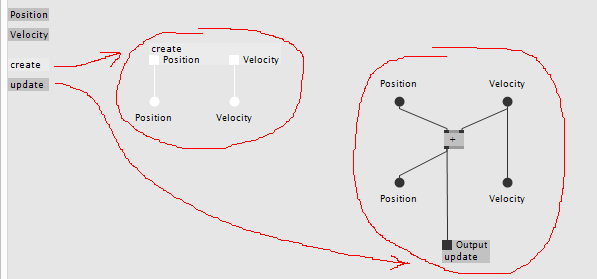
Reading the patch: In the (still rather rudimentary) listing on the left side you see that this patch has two properties called “Position” and “Velocity” and it has two operations called “create” and “update”.
We’ve mentioned operations before, they are sections in a patch that can be independently executed. In 45 every patch has only one operation, therefore we never gave it a name, but think of it like “update” or “evaluate”, ie. the operation that is called once every frame. In 50 a patch can have any amount of operations that can be executed any amount of times per frame (just dropping that here…more on it in a later posting).
So here the “create” operation is used to set initial values for a particles Position and Velocity properties. In further executions of “update” the velocity is always added to the position and the result is again stored in the “Position” property for the computation of the next frame. Also the result is being returned to the caller of the “update” operation as you can see via the little quad in the bar labeled “update”.
Next: How do we create an instance?
Instantiating a custom datatype
ad step 1) Lets again start with placing just a single particle in the patch:
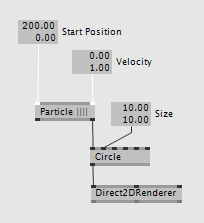
By simply creating a “Particle” node in a patch, what actually happens in 50 is that we create a static instance of the type “Particle”. Static meaning that it is instantiated when the program starts. The particle executes its “create” operation once and then repeats executing the “update” operation every frame until we delete the node or stop the program. We can of course create multiple Particle nodes next to each other and have multiple static instances.
Give it a velocity and it moves..done.
Creating dynamic instances
ad step 2) The challenge now is to create multiple instances of Particles dynamically. But don’t think 45 style SetPatch (VVVV)node, where you’d tell vvvv to actually create a Particle node and place it in a patch… no. This is where the 50 magic chimes in:
Instead of placing the “Particle” node as such in a patch we can also just call individual of its operations. Booom. In the patch below notice the “* Particle” node. This one is short for Particle.Create(), ie. calling the particles “create” operation to create and return a single instance. And then spot the double-decker “.update Particle” which is (not so short) for Particle.Update() that is called in the “For Each” region, ie. it is called once for each particle in the list.
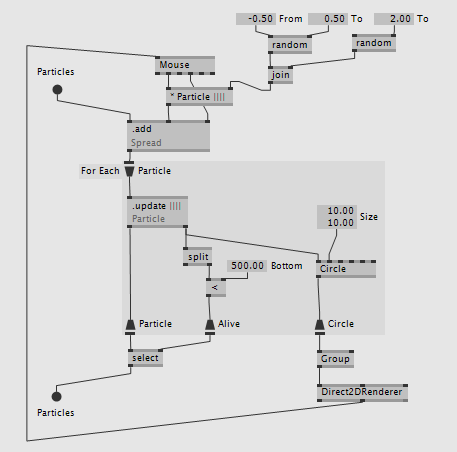
Reading the patch: When the left mouse button is pressed a new particle is added to the spread with the current mouse position as start position and a random velocity. Remember from the last posting about generics that the “.add Spread” is not specific to the particle! Then for each particle in the spread the update-operation is called so the particles move. Also for each particle a circle is created. The select node only takes particles that are still alive (ie. have an y < 500) and writes them back to the spread of particles. Finally all the circles are drawn in the renderer.
If you now once more compare the 45 and 50 approaches here is what you should note:
- in 45 the data of the particle is mixed together in a patch with the parts that manage the particlesystem (ie. add/remove particles). That works ok-ish in this simple example but is hell in larger scenarios.
- in 50 the data and functionality of the particle are conveniently wrapped inside a particle patch and another patch around the particle, which we could call ParticleSystem, simply manages multiple instances of particles. So when changing functionality in the particle nothing has to be changed in the ParticleSystem. This is big!
You still here? yawnsmiley… let us digest this information for a while. I think it is enough for this time. Still more to come.. goodnite.
Appreciate what you just read? We appreciate a click: /downloads|vvvv.


Comments:
Comments are temporarily disabled.