
When writing a plugin for vvvv the developer needs to at least add a reference to the VVVV.PluginInterfaces assembly. In order to do so there’ve been two choices up till now:
- Reference the assembly directly (e.g. from a vvvv-release)
- Reference the VVVV.PluginInterfaces project from the vvvv-sdk Both of these choices have drawbacks. Referencing directly requires the developer to update the assemblies manually with every new vvvv release, referencing the project enforced the inclusion of the whole vvvv-sdk which is quite large and sometimes tiresome to build.
Thanks to NuGet (a package manager for the windows development platform) and TeamCity (a build and NuGet server) a third choice emerged without the drawbacks mentioned above: referencing the assembly via a NuGet package.
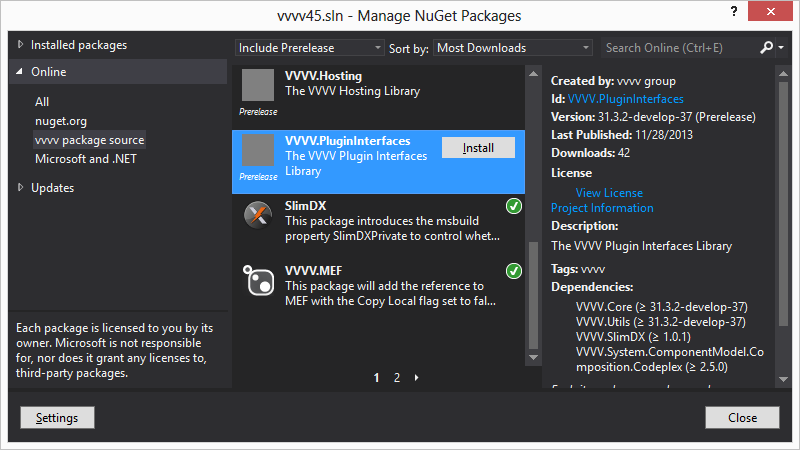
Everytime our build server builds a new version of vvvv, it will also create a bunch of NuGet packages (VVVV.PluginInterfaces, VVVV.Utils, etc.) with the appropriate version information. When doing an alpha build those packages will be considered as a so called pre-release package by NuGet, when doing a beta build those packages will be considered as a stable release.
Now in order to create a plugin for vvvv by using NuGet, the developer has to:
- Ensure the project is targeting at least .NET Framework 4.6.1 and is configured with the platforms x86 and x64.
- Add http://teamcity.vvvv.org/guestAuth/app/nuget/v1/FeedService.svc/ as a NuGet package source in the settings of the NuGet package manager shipped with either Visual Studio or Sharp Develop.
- Select the VVVV.PluginInterfaces package and click install.
NuGet will now download and add all the necessary dependencies to the project file and whenever a new version of vvvv is available, the NuGet package manager will ask whether or not to update the installed packages.
As of version 34.101 the packages should work in AnyCPU - for details see here


Comments:
Comments are temporarily disabled.