
This site relies heavily on Javascript. You should enable it if you want the full experience. Learn more.
MultiBoygrouping
All about Boygrouping
Introduction
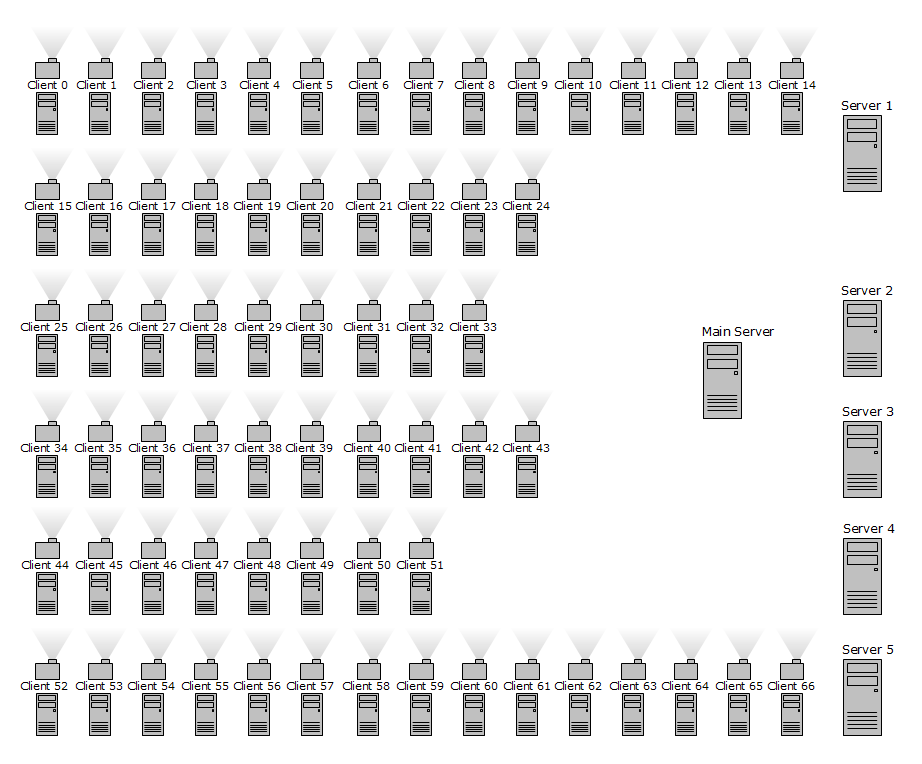 Click to enlarge
|
Simply put, clients cannot only obey to one master but receive patches and values from any number of servers you want them to. Examples
|
How to
|
Practically the only thing you need to do to assign a client to multiple servers, is starting it with additional /client commandline parameters, like: /client 192.168.0.100 /client 192.168.0.200:5555 Note that here it is necessary to use a different port for every connection as described in the FAQ. It is important to make sure all servers were started before any of the clients did startup. Otherwise the behavior maybe quite random.
|
Features
 Server1
 Server2
|
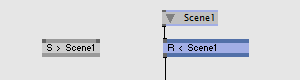
Using Send / Receive nodes on Server1 and Server2 respectively allows to transfer Layers or any other data of the Node Datatype! How to do this
See also: |
anonymous user login

Shoutbox
~2d ago
joreg:
The summer season of vvvv workshops at The NODE Institute is out: https://thenodeinstitute.org/ss24-vvvv-intermediates/
~2d ago
domj:
If you happen to be in Prague, come join us at the Schema workshop on Thursday 25.4. :)
https://www.facebook.com/events/395516526614988/?ti=ls
~6d ago
joreg:
Coming up: vvvv meetup on May 3rd: https://visualprogramming.net/blog/2024/24.-vvvv-worldwide-meetup/
~14d ago
joreg:
Postponed: Next vvvv beginner course starting April 29: https://thenodeinstitute.org/courses/vvvv-beginner-class-summer-2024/
~22d ago
joreg:
vvvv gamma 6.0 is out: https://visualprogramming.net/blog/2024/vvvv-gamma-6.0-release/
~1mth ago
~1mth ago
joreg:
Next vvvv beginner course starting April 15: https://thenodeinstitute.org/courses/vvvv-beginner-class-summer-2024/
~1mth ago
joreg:
The Winter Season of vvvv workshops is now over but all recordings are still available for purchase: https://thenodeinstitute.org/ws23-vvvv-intermediates/